Feedback System
KubeStellar Console has a unique feedback system. When you report a bug or request a feature, AI helps create the fix automatically!
How It Works
This is a closed-loop system:
You report → Maintainer reviews → AI creates fix → You test → Release!The Process
- You submit - Describe the bug or feature
- Maintainer triages - Reviews and approves
- AI analyzes - Figures out what needs to change
- AI creates PR - Makes the code changes
- You get notified - When a fix is ready
- You test - Try the preview deployment
- You approve - Provide feedback
- Release - Goes into next version
Bug-to-Squash
When something doesn’t work right, report it!
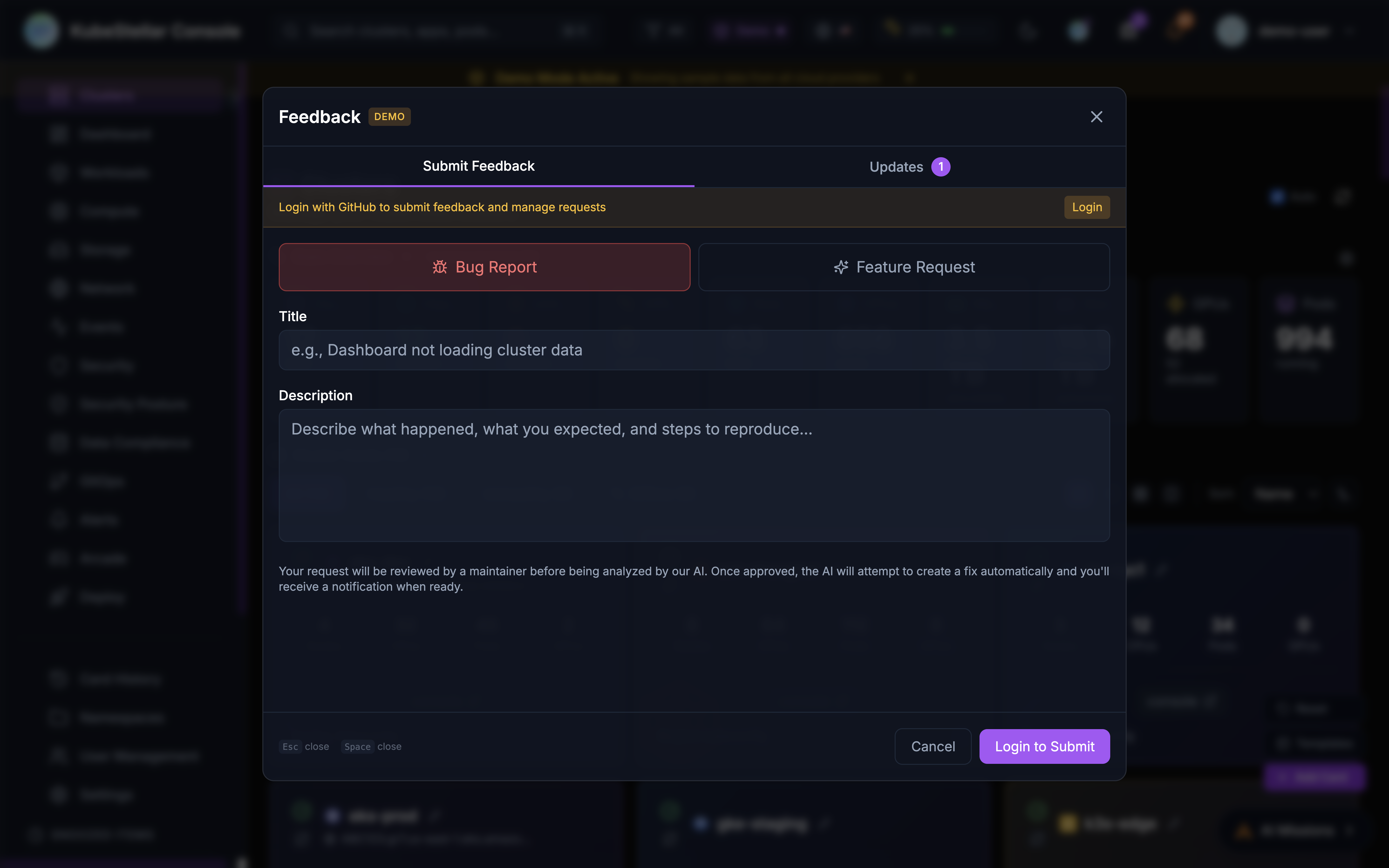
How to Report a Bug
- Click the bug icon in the top navigation bar, or navigate directly to
/issueor/feedbackin your browser - Select “Bug Report” tab
- Fill in:
- Title - Short description
- Description - What happened, what you expected, steps to reproduce
- Target Repository (optional) - Choose
console(default) ordocs
- Click Submit
Tip: Bookmark
http://localhost:8080/issueorhttp://localhost:8080/feedback(or your deployed URL +/issueor/feedback) to jump straight to the feedback dialog.
What Happens Next
| Status | Meaning |
|---|---|
| Open | Submitted, waiting for review |
| Needs Triage | Maintainer is reviewing |
| Triage Accepted | Approved for AI fix |
| Feasibility Study | AI analyzing the problem |
| Fix Ready | AI created a fix, needs testing |
| Fix Complete | You approved, going to release |
| Unable to Fix | Couldn’t be fixed automatically |
| Closed | Issue resolved or won’t fix |
Getting Notified
You’ll receive notifications when:
- Your bug is accepted for triage
- A fix is ready for testing
- The fix is released
Check the bell icon in the header for notifications.
Feature-to-Fulfillment
Have an idea? Request it!
How to Request a Feature
- Click “Report a bug or request a feature” (top bar) or navigate to
/issueor/feedback - Select “Feature Request” tab
- Fill in:
- Title - What feature you want
- Description - How it should work, why you need it
- Target Repository (optional) - Choose
console(default) ordocs
- Click Submit
Good Feature Requests
Do:
- Be specific about what you want
- Explain why it’s useful
- Give examples of how you’d use it
Don’t:
- Be vague (“make it better”)
- Request huge changes
- Duplicate existing features
Example
Good: “Add a dark mode toggle in settings so I can reduce eye strain at night”
Not as good: “The UI needs improvement”
Draft Save & Restore (New in April 2026)
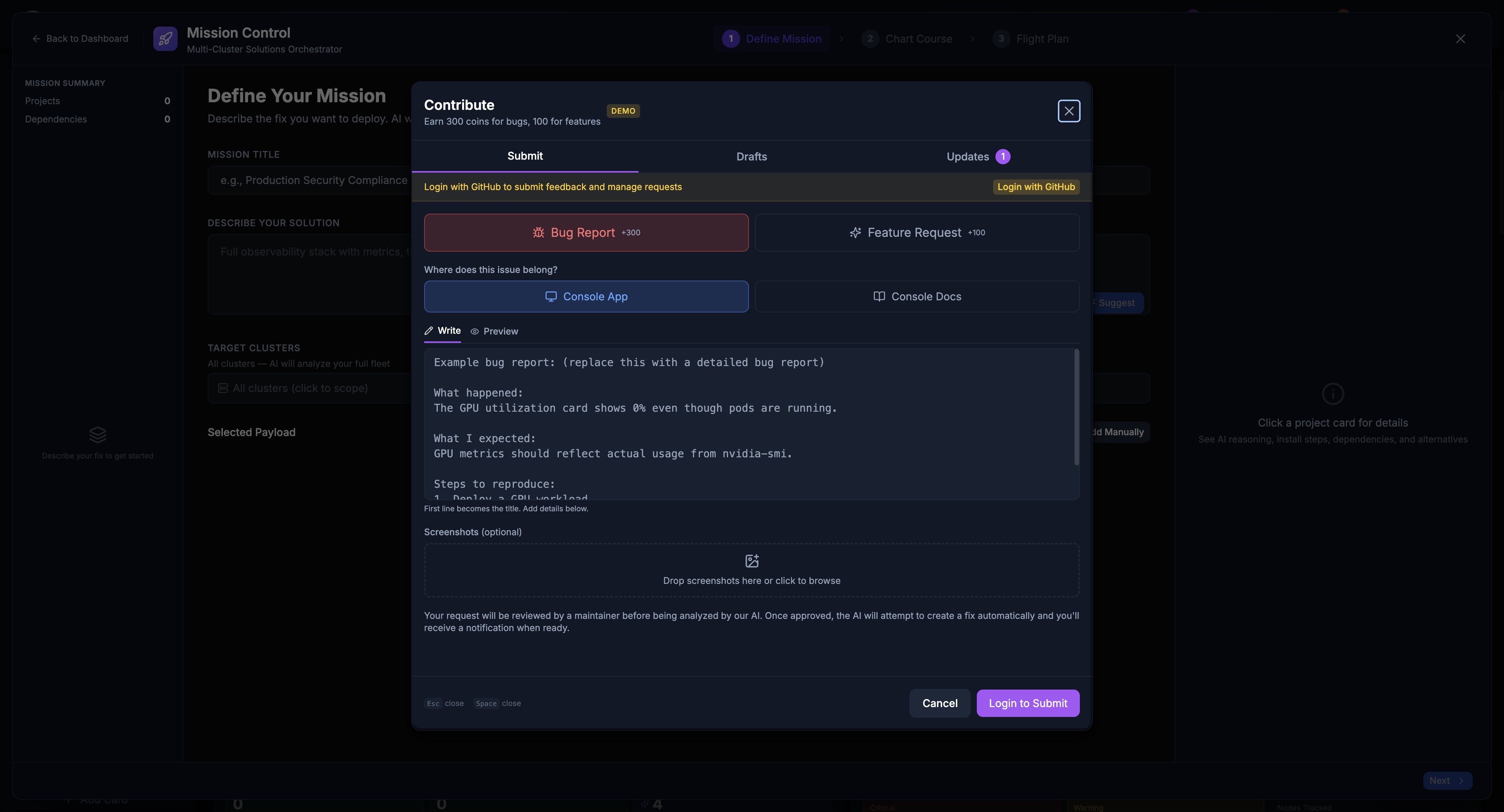
The Contribute dialog now includes a Drafts tab between Submit and Updates that lets you save work-in-progress bug reports and feature requests.
How Drafts Work
- Save a draft: Click “Save Draft” while composing a bug report or feature request. The draft is saved to localStorage.
- Restore a draft: Switch to the Drafts tab, find your draft, and click “Edit” to load it back into the form. An “Editing a saved draft” banner appears.
- Update a draft: Modify a restored draft and click “Update Draft” to save changes.
- Auto-cleanup: When you successfully submit a report from a draft, the draft is automatically deleted.
- Close protection: If you close the modal with unsaved content, a 3-way dialog offers Save Draft & Close, Discard, or Keep Editing.
Draft Limits
- Up to 20 drafts can be stored locally
- Drafts are synced across browser tabs via the
storageevent - Each draft shows its type (Bug/Feature), target repo, and relative timestamp
Tracking Your Requests
View Your Submissions
- Click “Report a bug or request a feature”
- Select “Updates” tab
- See all your submissions and their status
Request Statuses
open → needs_triage → triage_accepted → feasibility_study → fix_ready → fix_complete
                                    ↘ unable_to_fix
Testing Fixes
When a fix is ready, you can test it!
Preview Deployments
For each fix, a preview deployment is created. You’ll get a link to test the fix in a temporary environment.
Providing Feedback
After testing:
- Positive - The fix works! Click 👍
- Negative - Something’s still wrong. Click 👎 and explain
Your feedback helps improve the fix before it ships.
Why This Is Special
AI-Maintained Repository
KubeStellar Console is one of the first codebases that is continuously maintained by AI:
- Closed-loop - Your feedback directly creates code changes. Report a bug, get a fix. Request a feature, get it built.
- Fast - Fixes can be created in hours, not weeks
- Quality-checked - Every AI-generated fix goes through automated tests, code review, and human approval
- Always improving - The console is being developed all day, every day, with AI writing and reviewing code around the clock
How the Automation Works
Behind the scenes, a pipeline of AI agents handles your requests:
- Auto-QA scans the codebase for issues every hour
- Copilot coding agent creates pull requests to fix issues
- Copilot review agent reviews every PR for quality
- Auto-apply ensures review suggestions are incorporated
- Automated testing validates every change
- Human maintainers approve and merge
This means bugs get caught early, fixes get reviewed automatically, and releases happen frequently.
Human + AI
Humans still:
- Review and approve changes
- Make architecture decisions
- Handle complex changes
- Ensure quality
AI helps with:
- Analyzing problems
- Creating initial fixes
- Running tests
- Reviewing code
- Generating documentation
GitHub Integration
Behind the scenes, your requests become GitHub issues:
- You submit a request
- Console creates a GitHub issue
- GitHub Actions trigger AI analysis
- AI creates a Pull Request
- Maintainers review
- Tests run automatically
- Merge and deploy
You don’t need to know any of this - it just works!
Repository Selection
When you submit feedback, you can choose which repository the issue is filed in:
- Console (default) - For bugs or features related to the KubeStellar Console itself (UI, functionality, performance)
- Docs - For issues with the KubeStellar documentation (typos, unclear sections, missing explanations)
If you don’t select a repository, your feedback defaults to the Console repository. Select Docs if your report is about the documentation site or content.
What Data Is Collected
When you submit feedback, the following information is included in the GitHub issue:
Always Included:
- Your title and description
- Console Request ID (for tracking)
- Your user identifier
- Timestamp of submission
- Target repository selection
Optionally Included (if captured):
- Screenshots - Any images you attach or the console captures (base64-encoded)
- Console Errors - Recent browser console errors and warnings (from the last few operations)
- Failed API Calls - Any 4xx or 5xx HTTP responses from recent API requests
- Diagnostics - Environment information to help debug issues:
- Agent version and build time
- Browser type and operating system
- Go version (for agent compatibility)
- Installation method (dev/release)
- Connected clusters count
- Screen resolution and window size
- Browser language and URL context
All this data helps maintainers and AI agents quickly understand and fix issues. Console errors and diagnostics are never included in feature requests—only in bug reports.
API Routes Reference
If you’re integrating with the feedback system or running your own KubeStellar Console, here are the available API routes:
Submitting Feedback
POST /api/feedback/requests- Submit a new bug report or feature request- Requires authentication
- Body:
title,description,request_type(“bug” or “feature”),target_repo(optional, “console” or “docs”),screenshots,console_errors,failed_api_calls,diagnostics - Returns: Feature request object with issue number and GitHub URL
Viewing Your Submissions
-
GET /api/feedback/requests- List your own feature requests with pagination- Query params:
limit(default 20, max 1000),offset(default 0) - Returns: Array of feature requests
- Query params:
-
GET /api/feedback/requests/:id- Get details of a specific feature request- Returns: Single feature request with full status history
-
GET /api/feedback/queue- List all feature requests (for moderators/admins)- Query params:
limit,offset - Returns: Array of all feature requests across all users
- Query params:
Feedback on Fixes
-
POST /api/feedback/requests/:id/feedback- Submit feedback on a proposed fix- Body:
feedback_type(“positive” or “negative”),comment(optional) - Returns: Updated feedback record
- Body:
-
POST /api/feedback/requests/:id/close- Close a request (after fix is released)- Returns: Closed request status
-
POST /api/feedback/requests/:id/request-update- Request a status update on a feature request- Returns: Notification confirmation
Preview Deployments
GET /api/feedback/preview/:pr_number- Check if a preview deployment is ready for a fix- Returns: Preview URL and deployment status
Notifications
-
GET /api/notifications- Get your notifications- Query params:
limit,offset - Returns: Array of notifications (issue updates, fix ready, etc.)
- Query params:
-
GET /api/notifications/unread-count- Get count of unread notifications- Returns:
{ "unread_count": number }
- Returns:
-
POST /api/notifications/:id/read- Mark a notification as read- Returns: Updated notification
-
POST /api/notifications/read-all- Mark all notifications as read- Returns: Success confirmation
Webhooks (Internal)
POST /webhooks/github- GitHub webhook endpoint (for status updates from GitHub Actions)- Used internally by GitHub when issues/PRs are updated
- Validates webhook signature from GitHub
For Bug Reports
- Include screenshots if helpful
- Mention which page/card had the issue
- Note your browser and OS
- Describe recent actions before the bug
For Feature Requests
- Check if the feature already exists
- Be patient - complex features take time
- Provide examples from other tools
- Explain the problem you’re solving
General
- Be kind - there are humans and AI working to help
- Be specific - vague requests are hard to fix
- Test thoroughly - good testing means better releases